Built for the Dynamic Mediation™ approach
You listen.
It draws.
Dynamic Canvas™ is the live diagramming partner for mediators. You take notes in plain language, the way you always have. It reads each note as it lands and draws the system the conflict lives in — in the room, in real time, while you never look away.
The moment this was built for
The diagram is the intervention. And the diagram is exactly the thing you cannot stop to draw.
The session is forty minutes in, and the mediator has stopped writing. Not because there is nothing to capture — because there is too much.
A father and a daughter, three years of the same argument, and underneath it a tangle of cause and effect that neither of them can see from the inside. Every time she helps at home, her father relaxes, and her study time disappears. Every time her grades slip, he worries, and asks for more help. The thing pulling them apart is the same thing each of them is doing to hold it together.
The mediator can see the loop. She always can — that is the job. But to draw it, she would have to turn to the whiteboard, break eye contact, and leave the room, emotionally, while two people who have only just started talking watch her back. So she does not. She keeps the picture in her head, where the parties cannot see it. Which is the one place it does no good.
This is the bind at the center of systems-based mediation. Dynamic Canvas removes it.
What it is
A tool that draws while you listen.
You take notes in plain language. The app reads each note as it lands and builds a causal loop diagram from it: the forces that are rising and falling, the links between them, and the sign on each link. Does more of this lead to more of that, or to less? Boxes for the forces in play. Arrows for how they push on one another. A picture of the system, assembled one sentence at a time.
Type a note — "When she helps at home, her dad is happier, but it cuts into her study time" — and the canvas adds three forces and draws the links between them: one that reinforces, one that pulls against it. Type the next note and the picture grows. Mention something already on the canvas and it does not start over. It finds what is there, connects to it, corrects it, and merges the duplicates.
It is the diagramming — done for you, in the room, in real time.
The mediator's work is to help two people see the system they are both standing inside. Dynamic Canvas removes the one thing that always made that impossible in a live session: having to stop and draw it.
Why it matters to the practice
See the system, change the system.
In a systems-based approach to conflict, seeing the system is not a flourish at the end. It is the move itself. A dispute is not a pile of grievances to be sorted; it is a signal from a system that has organized itself around a pattern and cannot find its way out. The parties are not broken. They are stuck — caught in a loop that each of them is feeding without meaning to.
You cannot change a loop you cannot see. And every experienced mediator knows the quiet truth: the moment the parties can see the loop, the conversation changes. The question stops being whose fault is this and becomes which arrow do we change. Blame is backward-looking and personal. A diagram is forward-looking and shared. It moves two adversaries to the same side of the table, both of them now looking at the same picture instead of at each other.
Dynamic Canvas puts that picture on the table while the conversation is still warm — not in a write-up the parties will never read, but in the room, growing as they speak, theirs to point at and argue with and correct.
The diagram is the intervention — and now you can build it without ever leaving the room.
What makes it different
Not transcription. Not mind-mapping. Modeling.
Dynamic Canvas reads a sentence and works out the underlying structure of a conflict — and it does it in the one place drawing was never possible before.
Built for live work
Most diagramming tools assume you have time and quiet. A working mediation session has neither. Dynamic Canvas is designed for the middle of a real conversation, not the write-up afterward.
Understands causal structure
It reads a sentence and works out the variables — the things that can rise and fall — and the direction of cause between them, including the loops that reinforce a conflict and the ones that hold it in check.
Never loses your place
New notes settle in beside what they relate to. The existing picture stays put. Arrows route around each other so the diagram stays readable as it fills, and you are never disoriented by a layout that reshuffles underneath you.
Remembers every step
Every note submitted is a saved revision. Move back and forth through the history of the diagram — useful in the room, and invaluable afterward for reflection, supervision, and case notes.
Stays under your hand
The app proposes; the mediator disposes. Boxes can be dragged, arrows reshaped, and when the app is unsure whether two forces are really the same thing, it asks rather than guessing.
Hands you the next question
It reads the system it has drawn and offers questions to ask next — sorted by move, already shaped to this conflict. You are never handed a script; you are handed options, in your own method, at the moment you need them.
Reads the whole case back to you
When you need more than the live picture, it studies any saved revision and returns an evidence-linked reading of the system — its patterns, its contradictions, its leverage points, and what to ask next — with every claim traceable to the note it came from. The reflective pass the session never leaves room for.
See it in action
One session, four screens
A team conflict between two engineers, Anika and Tomás, with their HR lead Rachel caught in the middle and a VP leaning on all of them. Three screens from inside the session, one from the reflective pass afterward. Watch what the mediator types — and what the canvas does in return.
Screen one
The session view — notes in, system out
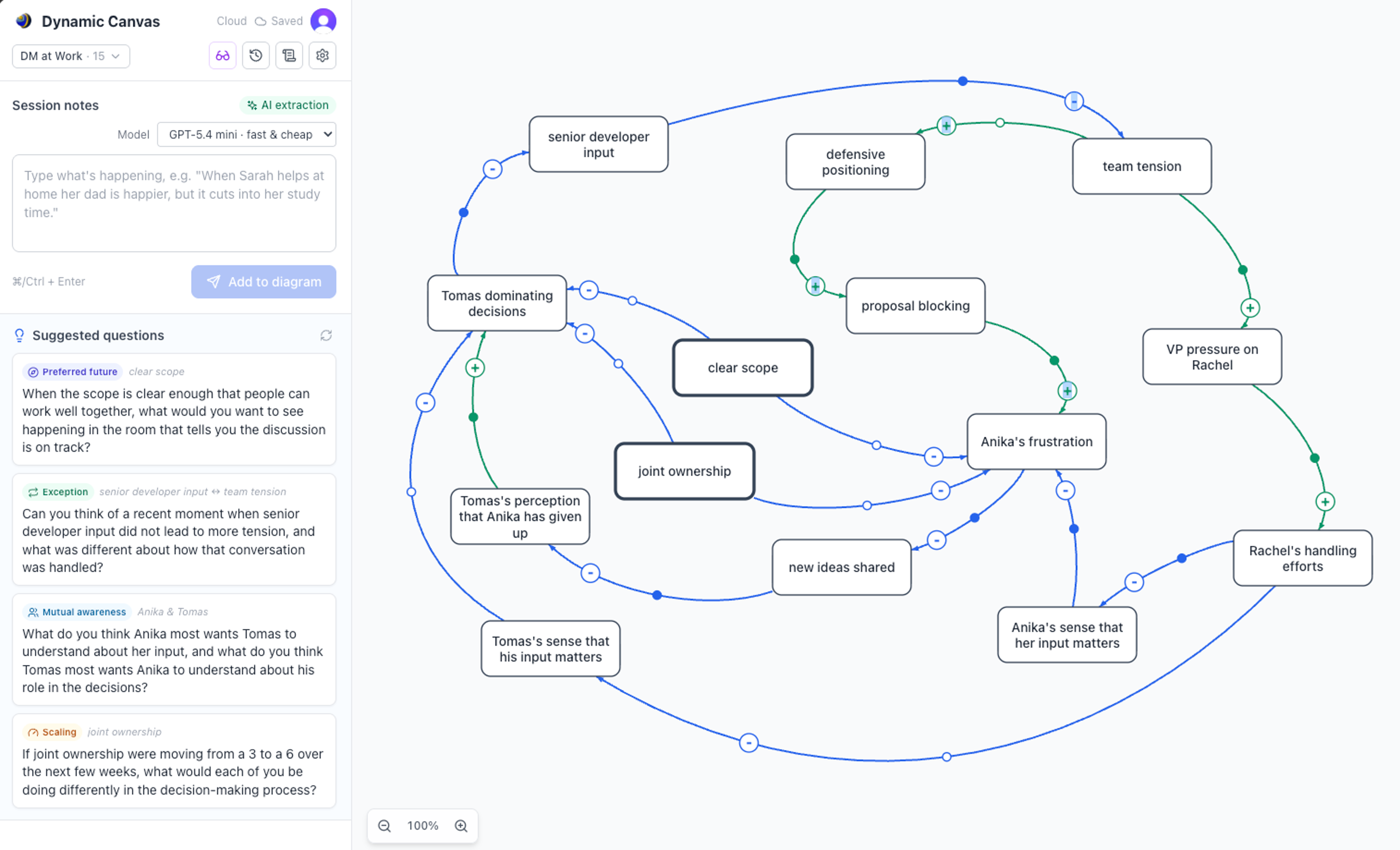
The whole tool in one screen. Top left: the mediator's note box. Bottom left: the questions the app offers back. Right: the causal loop diagram, drawn from the notes so far.
This is the screen the mediator lives in. They type what they hear into the note box — plain language, no syntax, no setup — and the system on the right grows to match. Each box is a force that can rise or fall: team tension, Anika's frustration, clear scope. Each arrow is a line of cause, and the small + or − says which way the push runs. Green links reinforce. Blue links restrain. Eighteen of them here, and the mediator drew none by hand.
The lower-left panel is doing something quieter and just as important. The app reads the diagram it has built and offers questions to ask next — sorted by move: a preferred-future question, an exception, one that builds mutual awareness, a scaling question. The mediator still chooses which to use, and when. But they never face the blank what do I ask now alone.
What this screen shows
Screen two
Reading a party — the system from one chair
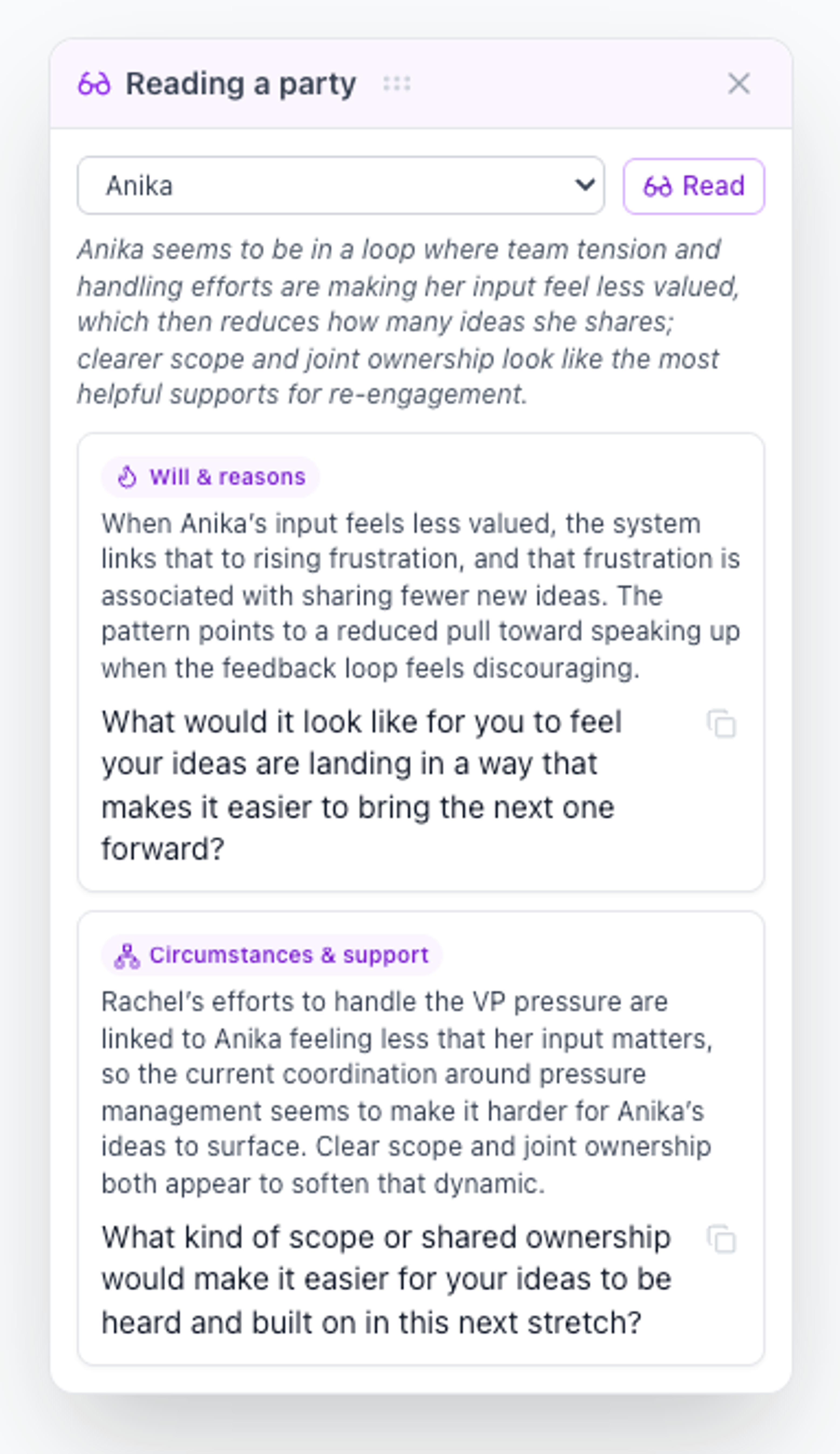
A diagram of the whole system is powerful. But mediation happens one person at a time, and each person stands in a different spot inside the same loop. The mediator selects a party — here, Anika — and the app reads the entire diagram from her position: the loop she is caught in, what is feeding it, and where the openings are.
Then it does the harder thing. It turns that reading into questions built for her — separated into what she wants (will and reasons) and what would help (circumstances and support) — each one forward-looking, each one assuming she is able to move. That is not a question pulled from a list. It is this party, in this system, on this day.
What this screen shows
Screen three
The notes log — your model, open and editable
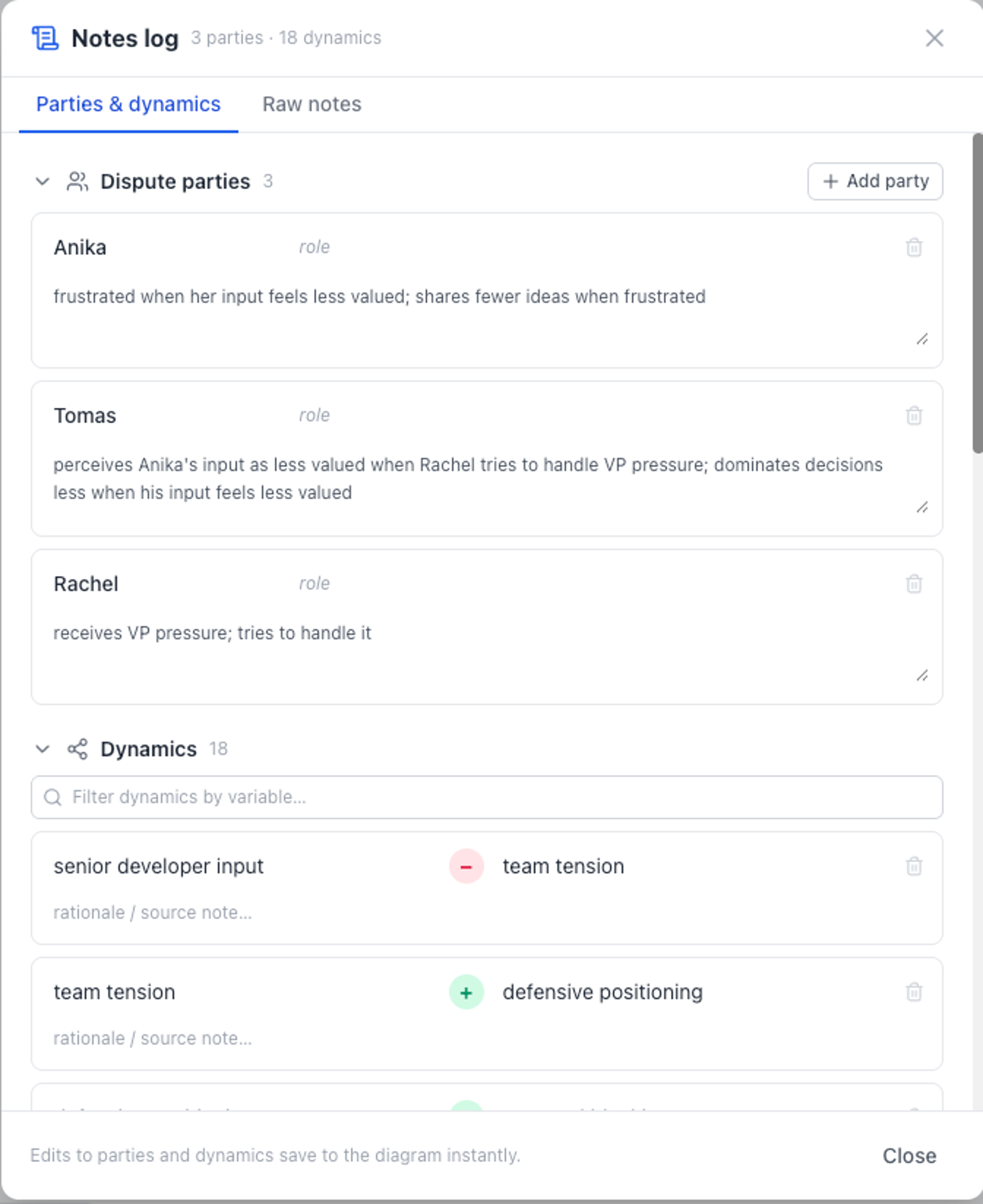
The app proposes; the mediator disposes — and this is where that promise becomes literal. Open the notes log and the entire model is on the table, nothing hidden. The parties it has tracked, each with the behavior the session revealed. And every dynamic it inferred: one force, the sign of the link, the next force, with room for the rationale and a path back to the note it came from.
Three parties, eighteen dynamics, all of it editable, all of it saving to the diagram the instant it changes. If the app read a link backward, you flip the sign and the picture corrects. If two forces are really one, you say so. A raw-notes tab keeps the full text of the conversation a click away.
What this screen shows
Screen four
The deep case review — the whole record, read closely
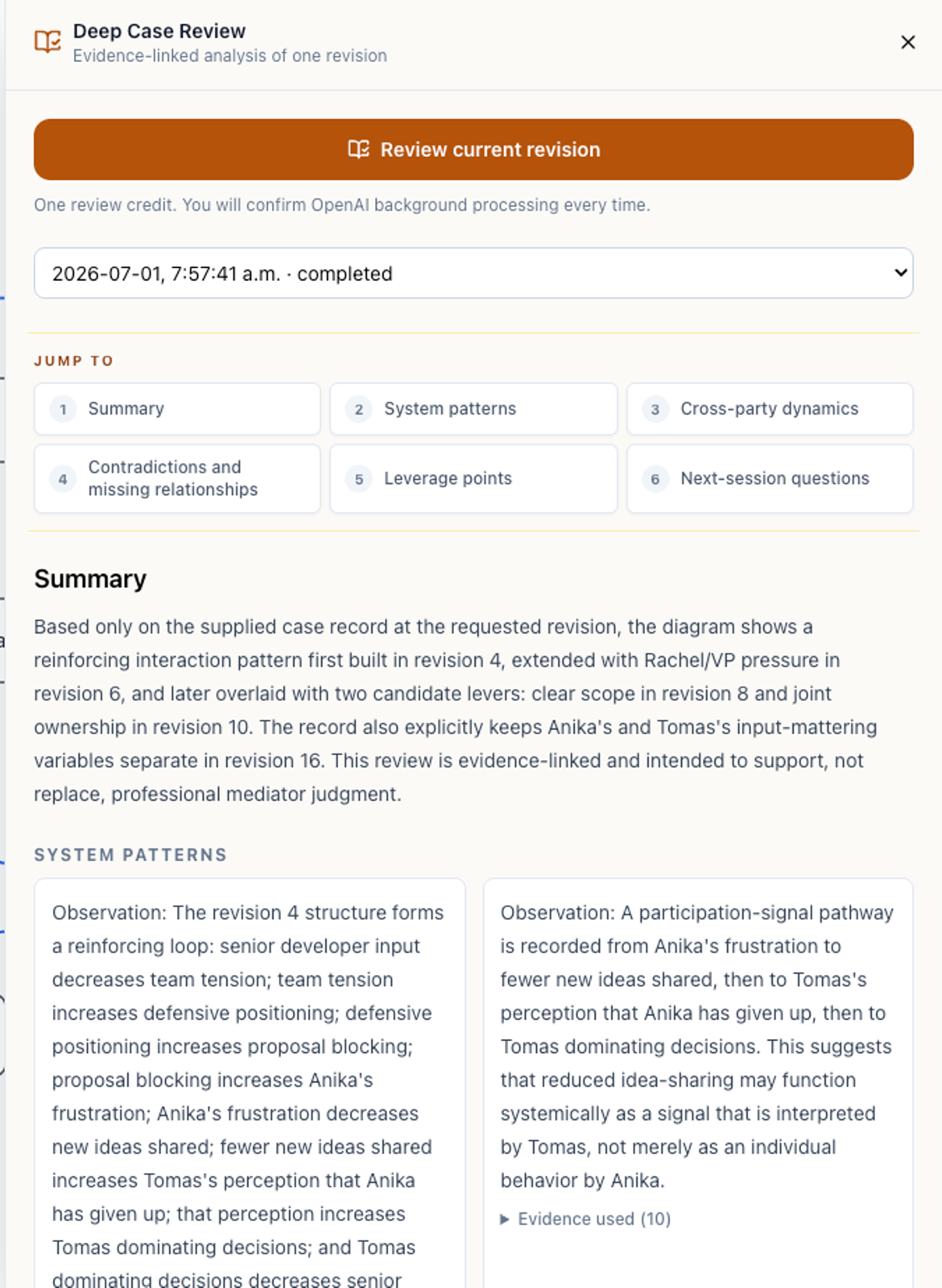
The live view keeps pace with the conversation. This does the opposite, on purpose. Pick any saved revision and the app steps back from the session to read the whole record slowly — the way a thoughtful colleague would if you handed them the case and asked what they saw. It is the reflective pass the room never leaves time for.
What comes back is not a summary. It is a structured reading in the language of the method: the system patterns holding the conflict in place, the cross-party dynamics running between the people, the contradictions and missing relationships the model has not resolved yet, the leverage points where a small change would do the most work, and the questions to carry into the next session. And every observation carries its evidence — each claim traces back to the note that produced it, so you can weigh the reasoning rather than take it on faith.
What this screen shows
Who it's for
For practitioners who already think in systems.
If your practice already treats conflict as a pattern to be understood rather than a fight to be refereed, this tool was built for the way you already work.
Questions you might be asking
Straight answers
Doesn't using software pull me out of the human moment?
The opposite. Today the drawing is what pulls you out — the turn to the whiteboard, the broken eye contact. Dynamic Canvas removes that interruption. You stay with the parties; the diagram keeps up with you.
Is this going to draw the wrong thing and embarrass me?
The app proposes; you decide. Nothing is locked. You drag, rename, reshape, and correct, and when it is genuinely unsure whether two things are the same, it asks rather than guesses. The picture the parties see is always the one you approved.
Do I have to learn a new way of working?
No. You take notes. That is the whole input. The method underneath is the systems-based mediation you may already practice; the tool simply does the part that used to require a free hand and a quiet room.
What about confidentiality?
Session content can be encrypted at rest, and retention can be set so old sessions are purged automatically. The sensitive parts live server-side, not in the browser. We will walk you through the current configuration before you bring it into live work.
See the diagram draw itself.
Try Dynamic Canvas, or let us walk you through how it fits a systems-based practice. The first conversation costs nothing and commits you to nothing.
Prefer to write first? ask@porrovia.com